
MedConnect LIS Integration Guide
API Documentation & Integration Reference — Version 2.0.0
For LIS/HIS Providers
This guide provides everything you need to integrate your Laboratory Information System (LIS) or Hospital Information System (HIS) with MedConnect.
Sham Software Consultancy — 2026
1. Overview and Authentication
1.1 What is MedConnect?
MedConnect is an orchestration engine that connects medical laboratory instruments (analyzers) with Laboratory Information Systems (LIS/HIS) by abstracting device protocol complexity behind simple API interfaces. It handles protocol translation, test mapping, order routing, result delivery, and automatic retry — so HIS/LIS systems never need to understand ASTM, HL7, or device-specific protocols directly.
1.2 Communication Flow
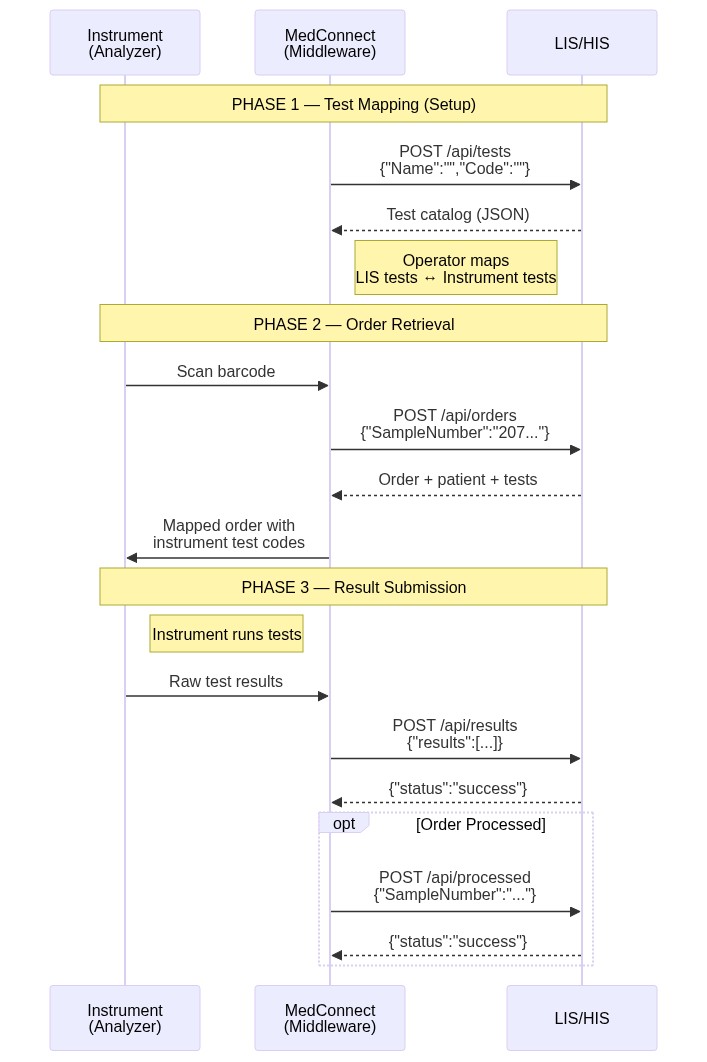
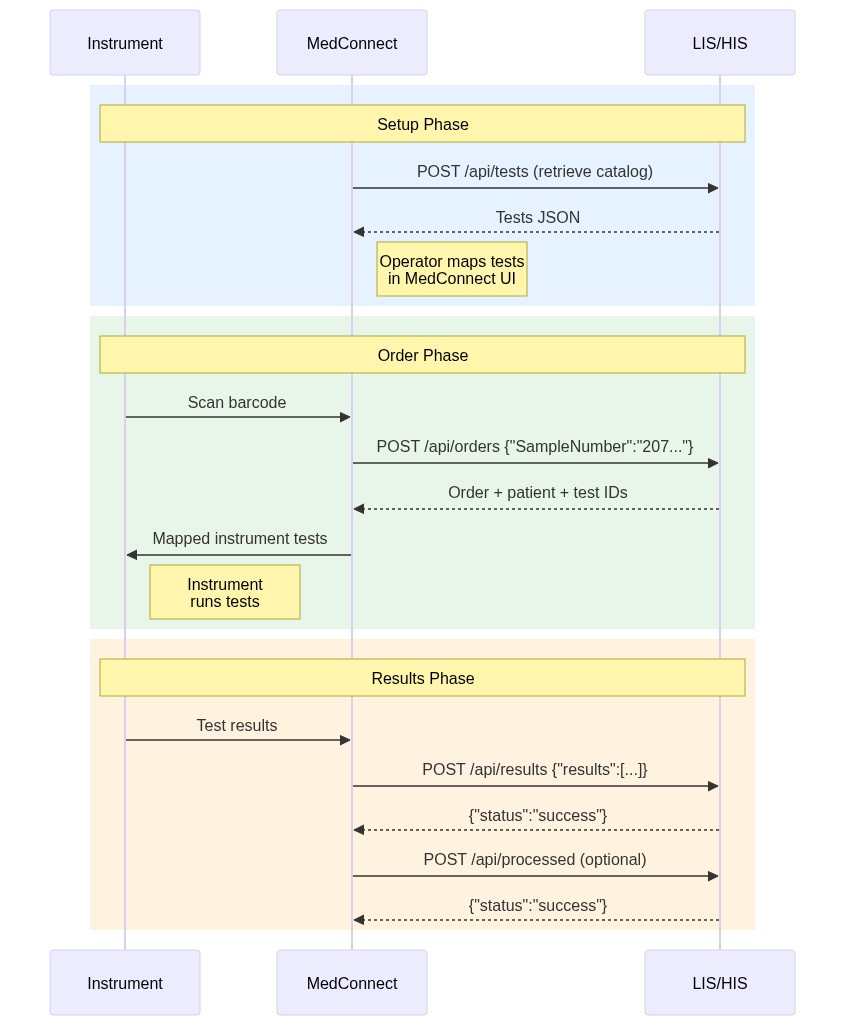
The integration follows a three-phase workflow regardless of mode:
1.3 Authentication
Bearer Token Authentication
MedConnect supports optional Bearer token authentication. When configured, MedConnect includes the token in every request:
Authorization: Bearer <your-token-here>
Content-Type: application/json
| Setting | Required | Description |
|---|---|---|
| Bearer Token | No | Static token sent in the Authorization header |
Custom Request Headers
MedConnect sends the following headers with every request for traceability:
| Header | Description |
|---|---|
X-Request-ID | Unique UUID for each request (for log correlation) |
X-Request-Timestamp | UTC timestamp of when the request was created |
X-Expected-Sample | The sample number being queried (on order requests only) |
Content-Type | application/json |
Accept | application/json |
1.4 Retry Behavior
MedConnect implements retry logic to handle transient failures:
| Scenario | Retries | Backoff Strategy |
|---|---|---|
| Order retrieval | Up to 3 attempts | Linear: 100ms × attempt number |
| Transient HTTP errors (5xx, timeout) | Up to 2 additional retries | Exponential: 2^n seconds |
2. HTTP REST API Reference
This section documents the HTTP REST API that the LIS/HIS provider must implement. MedConnect acts as the HTTP client and calls these endpoints.
All endpoints use HTTP POST with JSON payloads.
2.1 Endpoint Summary
| # | Endpoint Name | Purpose | Required |
|---|---|---|---|
| 1 | Tests API | Retrieve available LIS tests for mapping | Yes |
| 2 | Orders API | Retrieve order details by sample number | Yes |
| 3 | Results API | Submit test results | Yes |
| 4 | Processed API | Notify LIS that an order was processed | No |
2.2 Tests API
Used by MedConnect to search and retrieve the LIS test catalog. This enables test mapping between instrument test codes and LIS test codes.
Request
Content-Type: application/json
Authorization: Bearer <token>
| Field | Type | Required | Description |
|---|---|---|---|
Name | string | No | Test name search filter (partial match) |
Code | string | No | Test code search filter (partial match) |
Response
| Field | Type | Required | Description |
|---|---|---|---|
ID | string | Yes | Unique LIS test identifier |
Name | string | Yes | Human-readable test name |
Code | string | Yes | LIS test code |
Type | string | No | Sample type for this test |
2.3 Orders API
Used by MedConnect to retrieve order details for a specific sample. MedConnect sends this request when an instrument scans a barcode.
Request
Content-Type: application/json
X-Request-ID: <unique-uuid>
X-Expected-Sample: <sample-number>
| Field | Type | Required | Description |
|---|---|---|---|
SampleNumber | string | Yes | The barcode/sample number to look up |
allTests | string | No | Send "1" to retrieve all tests. Only relevant when Processed API is also used. |
Response
The response should contain an order object with the following fields (including a patient object with patient data):
| Field | Type | Required | Description |
|---|---|---|---|
SampleNumber | string | Yes | Order sample number |
TransactionDate | string | Yes | Order transaction date (yyyymmddHis) |
Priority | string | No | Order priority (S for stat, R for routine, capital letters) |
SampleType | string | Yes | The sample type: EDTA, Serum, Plasma, Urine, CSF, Suprnt, Whole blood, Synovial, Pleural, Peritoneal, Pericardial, Timed, Blood, Amniotic, Saliva, Cervical, Urethral, Ratio, Other |
Tests | array | Yes | Array of order test IDs |
patient | object | Yes | Patient data object (fields below) |
patient.ID | string | Yes | Patient LIS ID |
patient.Name | string | Yes | Patient name (preferred in English) |
patient.Sex | string | Yes | Patient sex (M, F, or U, capital letters) |
patient.DateOfBirth | string | No | Patient date of birth (yyyymmdd) |
patient.Age | string | No | Patient age |
patient.AgeUnit | string | No | Age unit (Y for years, M for months, D for days, capital letters) |
"status": "success",
"order": {
"SampleNumber": "2071720201",
"TransactionDate": "20250313101934",
"SampleType": "Serum",
"Priority": "R",
"patient": {
"ID": "104323",
"Name": "Tariq Tawfiq Hussein Mahmoud",
"Sex": "M",
"DateOfBirth": "19930101",
"AgeUnit": "Y",
"Age": "32"
},
"Tests": ["100", "102", "300"]
}
}
2.4 Results API
Used by MedConnect to submit completed test results to the LIS.
Content-Type: application/json
| Field | Type | Required | Description |
|---|---|---|---|
SampleNumber | string | Yes | Sample number the result belongs to |
TestCode | string | Yes | LIS test code |
SubTestCode | string | No | LIS sub-test code (used for panel components) |
Result | string | Yes | The test result value |
2.5 Processed API (Optional)
Used by MedConnect to notify the LIS that an order has been accepted and processed by the instrument. This allows the LIS to track order status and prevent duplicate processing.
Content-Type: application/json
| Field | Type | Required | Description |
|---|---|---|---|
SampleNumber | string | Yes | The processed order sample number |
Tests | string | Yes | JSON-serialized array of test IDs that were processed |
2.6 Local API Server (Incoming Push)
MedConnect can optionally run a local HTTP server to receive order pushes from the LIS. This is useful for LIS systems that prefer to actively push orders rather than waiting for MedConnect to poll.
Content-Type: application/json
| Status | Condition |
|---|---|
| 422 | Order data is missing or empty |
| 404 | Unknown route |
| 405 | Wrong HTTP method (only POST is accepted) |
| 500 | Internal server error |
2.7 Error Handling
HTTP Error Response Format
When the LIS returns an error, MedConnect expects the following JSON structure:
HTTP Status Codes
| Code | Meaning | MedConnect Behavior |
|---|---|---|
| 200 | Success | Process response normally |
| 400 | Bad Request | Fail with error message |
| 401 | Unauthorized | Fail (check Bearer token) |
| 404 | Not Found | Fail — endpoint URL is incorrect |
| 408 | Request Timeout | Retry (up to 2 additional attempts) |
| 5xx | Server Error | Retry with exponential backoff |
3. Reference Data
This section defines the standard code tables, enumerations, and data dictionaries used across the MedConnect API.
3.1 Sample Types
| Value | Description |
|---|---|
EDTA | EDTA anticoagulated whole blood |
Serum | Serum (clotted blood, no anticoagulant) |
Plasma | Plasma (heparin, citrate, etc.) |
Urine | Urine sample |
CSF | Cerebrospinal fluid |
Whole blood | Whole blood (no anticoagulant) |
Other | Other / unspecified |
3.2 Test Mapping
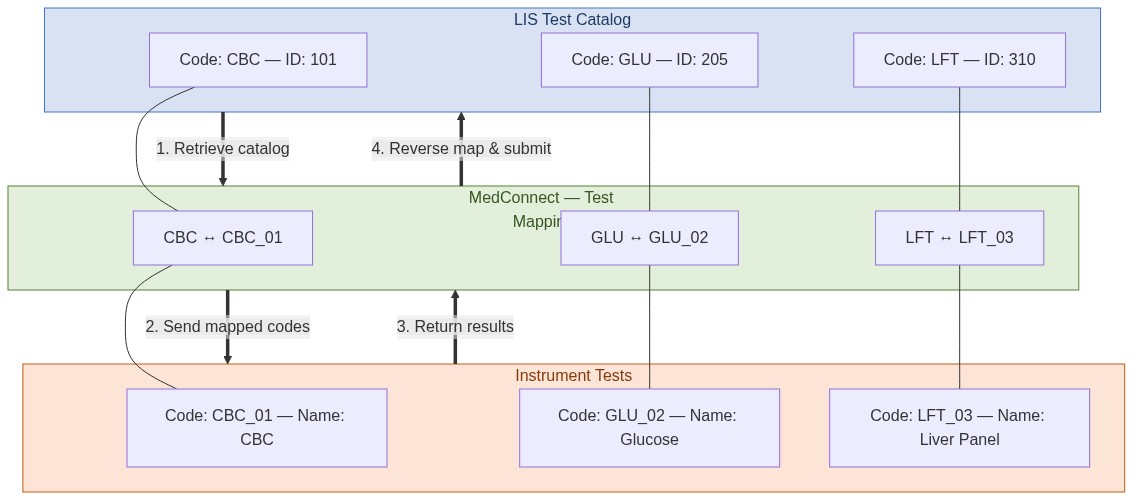
Test mapping is the process of linking LIS test codes to instrument (device) test codes. This is a critical setup step.
Mapping Process:
- MedConnect calls the Tests API to retrieve the LIS test catalog
- The operator maps each LIS test to the corresponding instrument test in the MedConnect UI
- This mapping is stored internally and used for converting test codes between LIS and instruments
4. Examples and Workflows
4.1 Interactive API Examples — Postman Collection
A complete, ready-to-use Postman Collection is provided alongside this document:
File: MedConnect_LIS_API.postman_collection.json
The collection includes every API endpoint with realistic request/response bodies, authentication headers, and environment variables.
4.2 Complete Integration Workflow
The end-to-end integration follows four sequential steps:
- Test Mapping — Retrieve Test Catalog: MedConnect calls the Tests API to retrieve the LIS test catalog. The operator then maps each LIS test to the corresponding instrument test.
- Order Retrieval — Get Order by Barcode: When an instrument scans a barcode, MedConnect queries the LIS for order details.
- Result Submission — Send Results to LIS: After the instrument completes testing, MedConnect submits results to the LIS.
- Mark Order as Processed (Optional): Notify the LIS that the order has been accepted and processed by the instrument.